Docs
Skills and routing
Give each agent its own instructions, choose the model per pull request in plain English, review PR quality alongside code, and share custom skills across agents.
1. Review-agent skill
Each agent reviews from its own review-agent skill: a Markdown file in your repository that says what to look for, what to ignore and how your team works. A security agent and a payments agent can review the same pull request with completely different instructions.
Save the file as SKILL.md in a folder named exactly like the agent's name. PURA checks these locations in order and uses the first one it finds:
.agents/skills/<agent-name>/SKILL.md(recommended).claude/skills/<agent-name>/SKILL.md.github/skills/<agent-name>/SKILL.md- a custom skill on the agent whose folder has the agent's name
PURA reads skills from your default branch, so the instructions a pull request is reviewed against are always the ones your team has merged. Without a skill, an agent reviews with built-in instructions.
The optional frontmatter holds the skill's name, description and .pura-routing. Everything below it is the agent's review guidance, up to 64 KB:
# .agents/skills/security-agent/SKILL.md
---
name: security-agent
description: Security-focused code review.
.pura-routing: |
  Use this only for nodejs files. For large changes, use the high model.
---

Review for security issues: injection, secrets and auth mistakes.

- Treat every request body as untrusted input.
- Flag direct string concatenation into SQL.
- Ignore formatting and naming.
Skills guide the review; they can't override it. If any repository content, a skill included, tries to direct the reviewer, for example to approve the change, PURA reports it as a 🔴 P1 finding.
2. Routing
Use .pura-routing in a skill's frontmatter to say, in plain English, when the agent should review and which model tier it should use.
For each pull request, PURA reads the changed files, description, commit messages and size, and makes one quick call with the agent's low model to pick an outcome:
- none: this agent sits this pull request out.
- default: review with the default model.
- high: review with the high model.
- low: review with the low model.
Examples:
- “Use this only for nodejs files.” Pull requests with Node.js files get the default model; the rest are left to your other agents.
- “For large changes, use the high model.” Large pull requests get the stronger model.
- “Do not run if it's only doc changes.” Docs-only pull requests are left to your other agents.
Routing is optional. Without .pura-routing, the agent reviews every pull request in its scope with its default model, with no extra call.
3. PR quality review
Set an agent's type to PR Quality Review and it reviews the pull request itself instead of the code: the title, description, labels and commit messages. Use it to hold every pull request to your team's standard, so reviewers know what changed and why before they open the diff.
New accounts include one, pr-quality-review-agent, and you can add more. Out of the box it reports a missing title as 🔴 P1 and a missing description as 🟠 P2. To set your own standard, give it a review-agent skill like any other agent:
# .agents/skills/pr-quality-review-agent/SKILL.md
---
name: pr-quality-review-agent
description: Checks pull request titles, descriptions and commits.
---

- The title follows Conventional Commits, e.g. "fix(billing): round VAT per line".
- The description explains why the change is needed and how it was tested.
- Changes to the public API carry the "api-change" label.
- Commit messages are written in the imperative mood.
Quality findings appear in the PR Quality Review section of the PR Overview Comment, each with its own id. Comment /pura ignore <id> to mute one on this pull request, or /pura ignore always <id> (repo admins) to mute it everywhere.
A quality review reads only the pull request's metadata, so it's fast and costs little. Routing, budgets, the verdict and the overview totals work exactly as they do for code review.
4. Custom skills
A custom skill is reusable guidance, such as a security checklist or your API conventions, kept in one GitHub repository and shared across agents. You add it to an agent in the dashboard, and the reviewer uses it when it's relevant to the pull request. Edit it once and every agent that uses it picks up the change on its next review.
Available on Scale (10 skills), Pro (25 skills), Enterprise (custom). See pricing.
To add one, point the agent at the skill's folder:
- Organization and repository, e.g.
acme/shared-skills - Branch, e.g.
main - Path to the folder holding
SKILL.md, e.g.skills/api-conventions
Custom skills follow the Agent Skills specification. The reviewer sees each skill's name and description, and reads the full SKILL.md when it needs it:
# acme/shared-skills: skills/api-conventions/SKILL.md
---
name: api-conventions
description: Acme REST API conventions. Use when a change adds or edits an HTTP endpoint.
---

- Routes are plural nouns: /invoices, not /getInvoice.
- Errors return { "error": { "code", "message" } } with a 4xx or 5xx status.
- List endpoints are paginated with ?cursor= and ?limit=.
Two options per skill:
- Invoke by default (off by default): turn it on to have the reviewer use the skill on every review.
- Sanitize (on by default): screens the skill for unsafe instructions before the reviewer sees it. Turn it off for sources you fully trust.
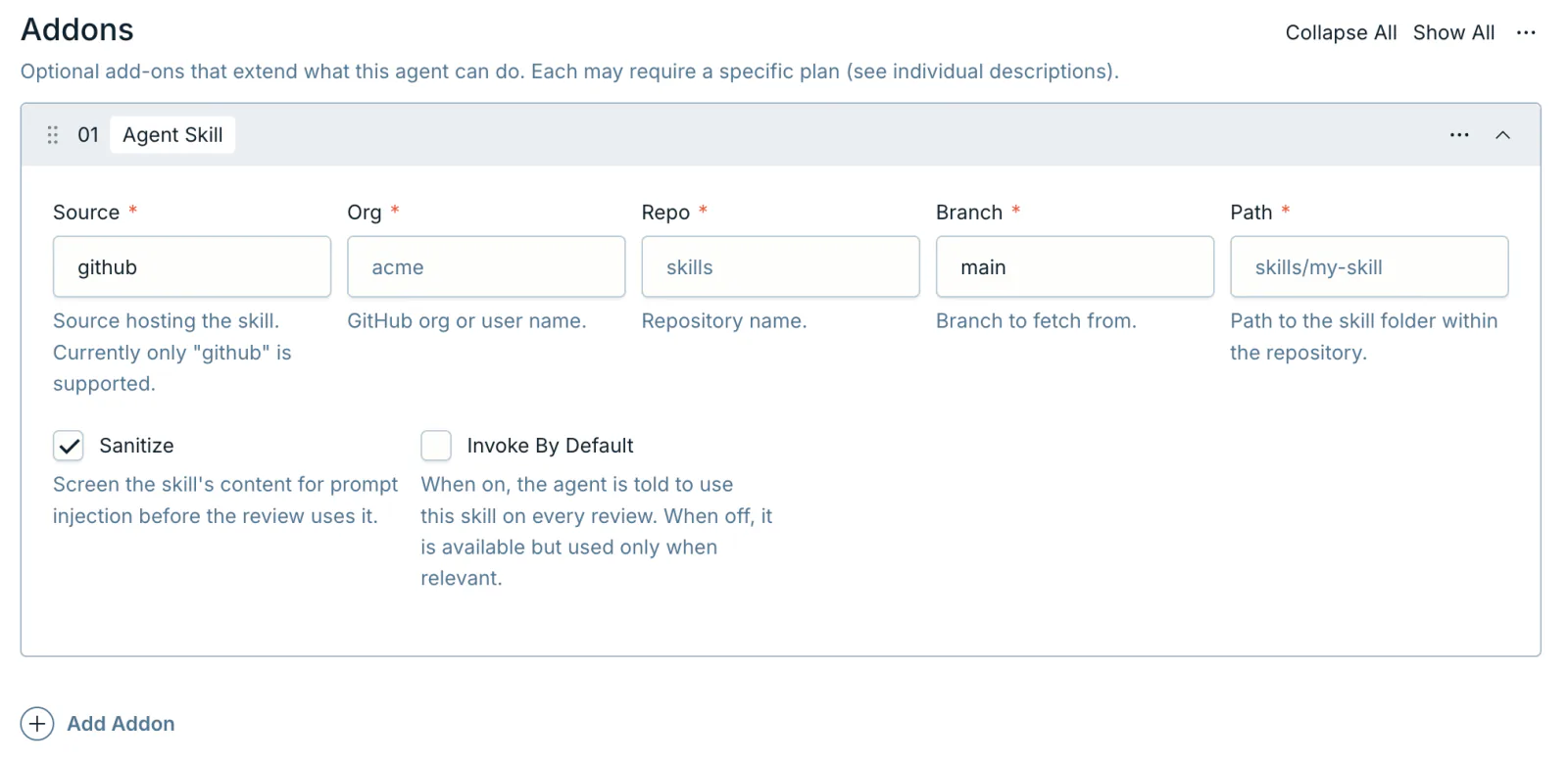
A custom skill whose folder has the agent's name becomes that agent's review-agent skill, so you can manage review instructions for many repositories from one place.
Next