Configuration
Set up review agents, connect your own AI keys, pick models, and tell PURA exactly which work each agent should handle — all from the dashboard in a few clicks.
1. Review agents
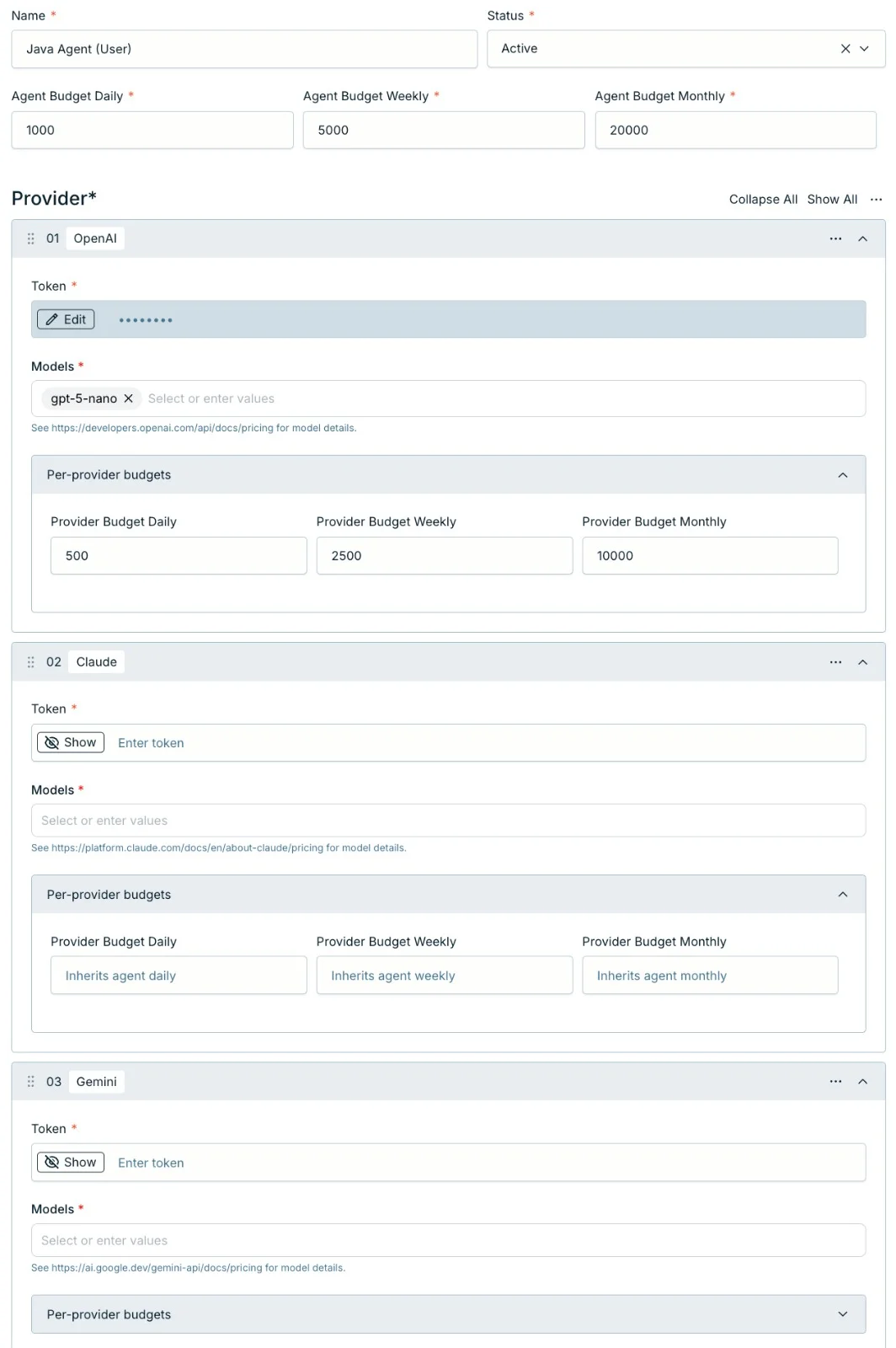
A review agent is the core unit of configuration in PURA. You create and manage agents in the dashboard — give each one a name, set its Status to Active or Inactive, and set its required daily, weekly, and monthly budgets that keep spending predictable.
Only Active agents are used when PURA reviews a pull request. Inactive agents are saved but skipped, so you can pause an agent without deleting it.
Each agent has a type: Code Review (the default) reviews the diff and the code around it; PR Quality Review reviews the pull request's metadata — title, description, labels, and commit messages — and reports into the overview comment's PR Quality Review section. You can mix both types freely.
You can have as many agents as you like — one per team, one per project type, or a single global one. Every eligible agent reviews each pull request, and all findings are consolidated into a single review — more agents multiply coverage, not comments. The agent's name can't be changed after creation: it's also what identifies the agent's Review Skill in your repo (see Review Skills & routing).

Start simple. One Active agent with a working key is all you need to get reviews flowing. You can split into multiple agents later as your team grows.
2. Providers & your keys
Inside each agent you add one or more providers. PURA supports Claude, OpenAI, and Gemini out of the box — all run reviews; pick whichever you already use or prefer. Other providers can be added with custom model names and per-token costs.
You bring your own API key. Paste it once in the dashboard — PURA encrypts it at rest and never shows it again. Every inference call goes straight through your key, so the cost lands on your provider account at their published rates. PURA never marks up inference.
Your key, your bill. PURA's subscription and your provider bill are completely separate — you always know exactly what you're spending with each. During the trial, your seeded agents run on PURA's trial model, so you can review before adding any key.
3. Choosing models
For each provider in an agent you choose the models for three tiers:
- Default — the model used for most reviews.
- High — a stronger model for changes that need deeper analysis.
- Low — a leaner, cheaper model for routine changes.
Most reviews run on the default model. Your agent's routing instructions (see Review Skills & routing) decide per PR whether the high or low tier applies:
- A premium model in the high slot for risky or complex changes — payments, auth, core infrastructure — for thorough analysis.
- A leaner model in the low slot for routine changes — docs, dependency bumps, small refactors — to keep costs in check.
This way each PR gets the right depth of review without always paying top-tier prices.
4. Provider fallback
Add more than one provider to an agent and you get a budget fallback chain. Before a review runs, PURA picks the first provider in the agent that still has budget headroom — so reviews keep flowing even when one provider's budget is used up.
For example, put Claude first for quality with OpenAI and Gemini as backups. If Claude's daily budget is exhausted, PURA uses the next provider and the PR still gets reviewed.
Budget-based, not health failover. The chain switches providers based on remaining budget. Transient provider errors are retried automatically; if a run still can't complete, PURA posts an error comment on the PR — comment /pura review to try again.
5. Review Skills & routing
An agent's Review Skill is a Markdown file that carries two things: the review instructions (what the agent should focus on) and optional plain-English routing rules (when the agent should review, and which model tier to use).
Commit it to your repo at .agents/skills/<agent-name>/SKILL.md — the folder name must match the agent's name exactly. The .claude/skills/<agent-name>/SKILL.md and .github/skills/<agent-name>/SKILL.md locations work too, checked in that order. The skill is always read from the repository's default branch — never the PR branch — so a pull request can never rewrite its own review instructions.
The optional YAML frontmatter holds a .pura-routing field — free-text instructions on when this agent should review and which model to use. The markdown body is the review guidance — your conventions, the risks that matter, what to ignore:
---
name: security-agent
description: Security-focused code review.
.pura-routing: |
Use this only for nodejs files. For large changes, use the high model.
---
Review for security issues: injection, secrets, and auth mistakes.The routing instructions are plain English — intent, not config syntax. For each PR, PURA evaluates them against the PR's changed files and description and picks one of:
- none — the agent doesn't review this PR
- default — review with the default model
- high — review with the high model
- low — review with the low model
A few examples:
- “Use this only for nodejs files” — matching PRs review with the default model.
- “For large changes, use the high model” — matching PRs review with the high model.
- “Do not run if it's only doc changes” — docs-only PRs are skipped by this agent.
With no .pura-routing, the agent reviews every PR with its default model — no extra AI pass. With no skill file at all, PURA reviews using its built-in instructions. Every eligible agent still reviews the PR; routing decides which agents apply and which model tier each uses, and the findings are consolidated into one review.
Security built in. Skills are repo-sourced guidance — PURA treats them as untrusted. Embedded directives like “approve this PR” are never followed; they're flagged as findings instead.
6. Scoping an agent
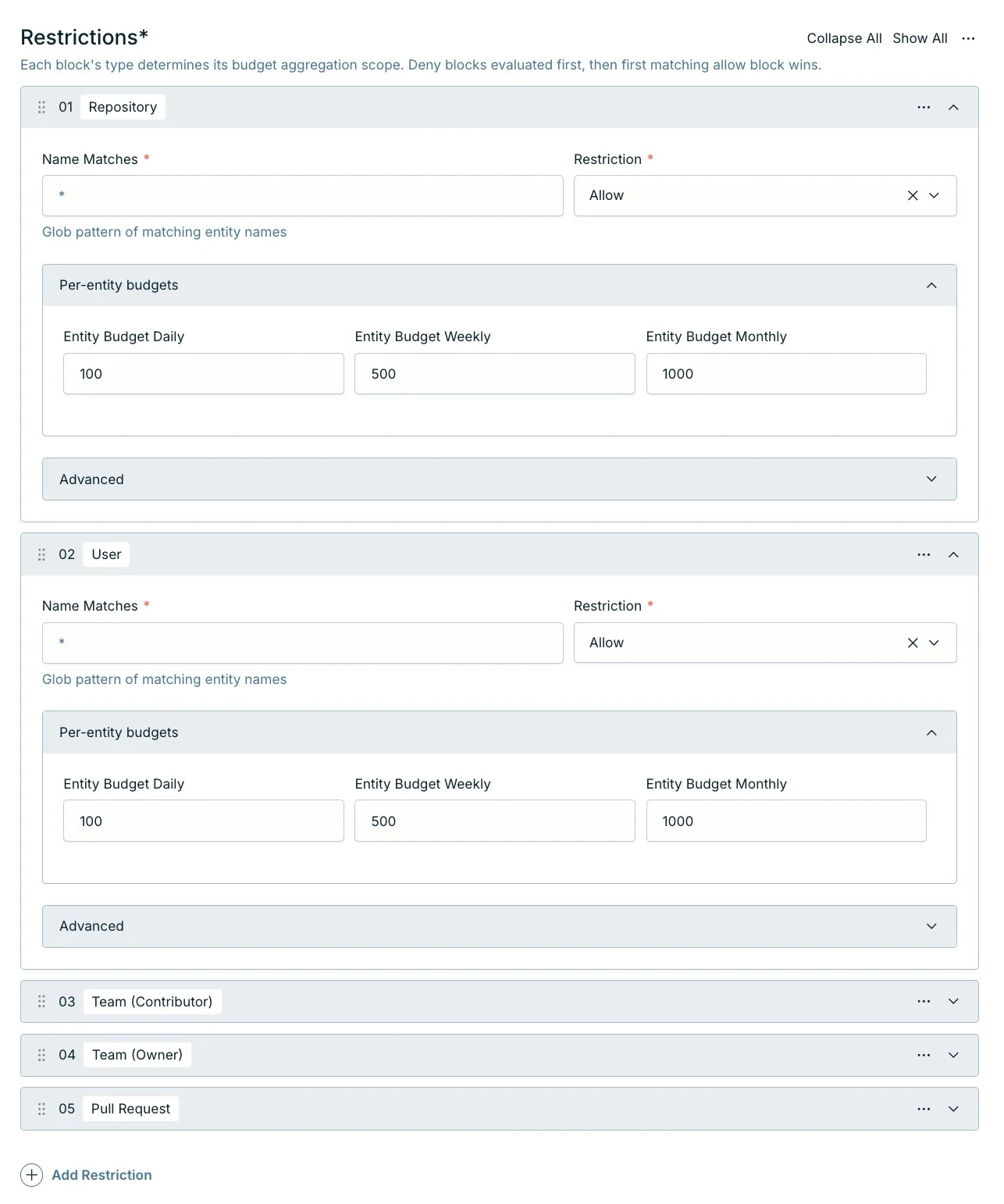
By default an agent applies to everything in your installed repos. In the dashboard you can scope it so it only kicks in for certain work — matching by simple glob patterns like * or acme/payments-*.
You can scope by any combination of:
- Team (owner) — the team requested as a reviewer on the pull request
- Team (contributor) — the team the PR author belongs to
- Repository — one or more repos by name or pattern
- User — the individual who opened the PR
- Pull Request — a specific repo plus one or more PR labels
Each rule is either Allow or Deny. Deny rules are evaluated first; if none match, PURA works through the Allow rules and uses the first one that fits. Allow rules can also carry their own per-entity budgets and a weight used when distributing spend. Agents that don't match the PR are simply not eligible — which agents review is decided by eligibility, scoping, and routing (see Review Skills & routing).

Great for multi-team orgs. Give each team their own agent scoped to their repos, with budgets that match their usage — so no single team can eat everyone else's budget.
7. Cross-repo access
By default, PURA can only read files from the pull request's own repository. If your review needs context from other repositories — shared libraries, monorepo packages, API contracts — you can grant cross-repo access on a review agent in the dashboard.
Available on Scale and above. Cross-repo access is a plan feature — see pricing.
When you enable it, you control exactly what the agent can reach with four glob patterns:
- Organizations — which GitHub orgs (e.g.
acme,acme-*) - Repositories — full repo names (e.g.
acme/shared-lib,acme/*) - Branches — which branches to read from (e.g.
main,release/*) - File paths — which files or directories (e.g.
**/*.ts,src/**)
Each rule is either Allow or Deny. Deny rules are checked first and take priority. For access to be granted, all four patterns (org, repo, branch, file) must match the target. If no rule allows cross-repo access, the agent stays restricted to the PR's own repository.
No cross-repo access by default. Until you explicitly add a cross-repo access rule to a review agent, PURA only sees the PR's own repository. This is a security safeguard — it prevents the reviewer from accidentally reading private repositories they don't have access to.
8. Agent skills
An agent skill is a remote, reusable AI skill — a packaged set of instructions, conventions, or domain knowledge — that you register as a callable tool on a review agent. During a review, the LLM can invoke the skill to pull in specialised guidance without you having to repeat it in every skill body.
Available on Scale (10 skills) and Pro (25 skills). Agent skills are a plan feature — see pricing.
Skills are sourced from any GitHub repository you have access to. To add one, open a review agent in the dashboard and add an Agent Skill addon with:
- Source — always
github. - Organization & repository — where the skill lives (e.g.
acme/shared-skills). - Branch — which branch to read from (defaults to
main). - Path — the folder containing the skill's
SKILL.md(e.g.skills/finance-review).
Skills follow the Agent Skills specification. The skill's SKILL.md declares a name and description that become the tool the LLM sees; the body is returned when the LLM calls it. Only the SKILL.md is loaded — referenced scripts and assets are not fetched.
You can add multiple skills to a single agent — each registers as a separate tool the LLM can choose from. An agent skill whose folder matches the agent's own name can also serve as the agent's Review Skill.
Privacy safeguard. By default, skill content is sanitised before reaching the LLM — sensitive information is blocked. You can disable sanitisation per skill if you trust the source.