How to Cap AI Code Review Spend Per Developer
Stop runaway LLM costs by giving every contributor their own review budget — without slowing anyone down.
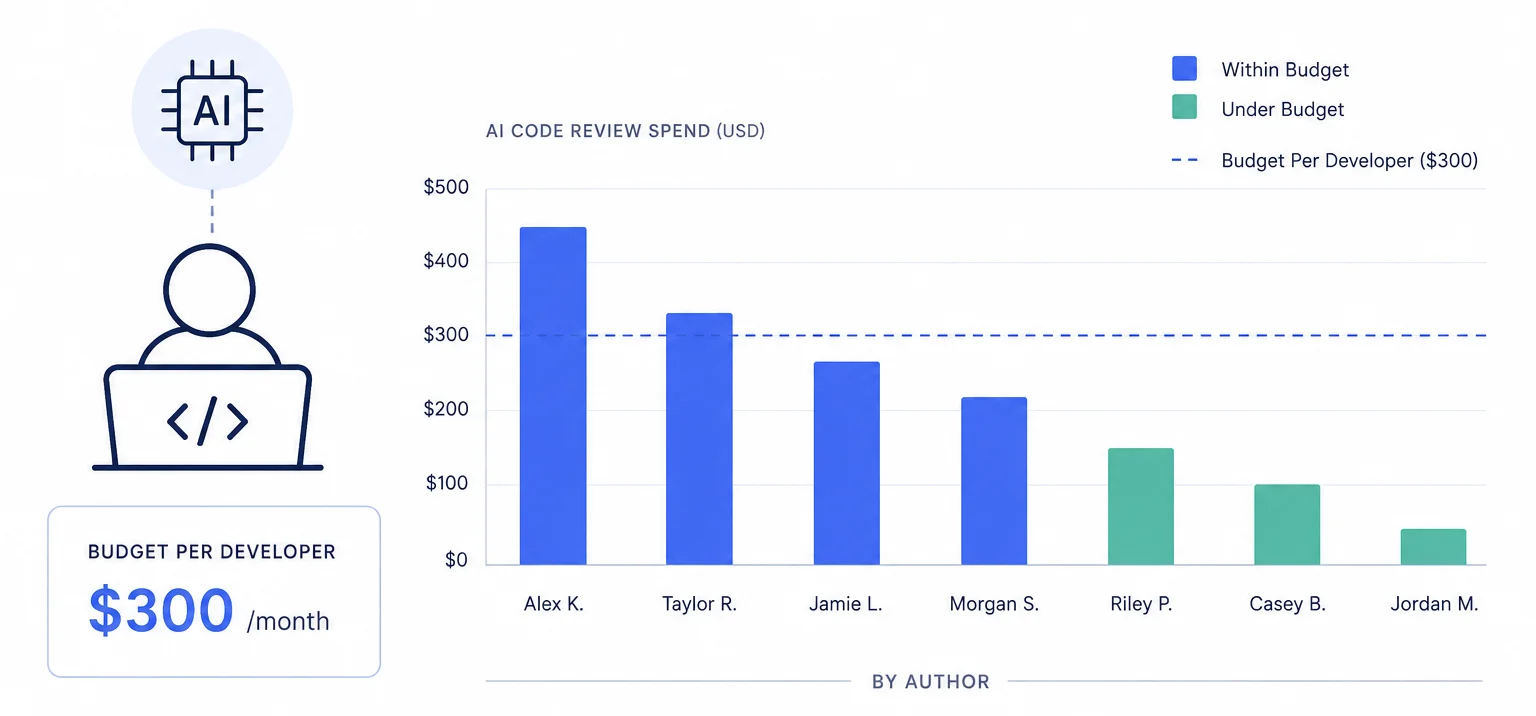
The problem with one-size-fits-all review budgets
Most teams set a single monthly cap on AI code review spend and call it done. It works for about two weeks. Then the same thing always happens: the intern's Dependabot PRs and the staff engineer's auth refactor both pull from the same pool. By the 20th of the month the budget is cooked, and the PR that actually needed a thorough review gets skipped.
You could raise the cap, but that's not a budget — that's surrender. The real issue isn't the total. It's that every contributor draws from the same undifferentiated bucket regardless of what they're shipping or how much scrutiny their changes actually warrant.
This is the budget version of the tragedy of the commons. When a shared resource has no per-user guardrails, rational individuals consume it until it's gone. Your AI review budget isn't air or water, but the dynamic is identical.
Per-author budgets: the fix that takes five minutes
PURA lets you assign budgets at the individual contributor level through its budget restriction system. Instead of one global cap, you create "user"-type budget restriction blocks — one per person or pattern — and each gets its own daily, weekly, and monthly dollar ceiling.
Here's what that looks like in practice. You open the PURA dashboard, navigate to a review agent, and add user-scoped budget restrictions:
- Staff and senior engineers — one allow block per person —
alice,bob,carol— each with a monthly entity budget of $25. These are the people touching payment logic, auth flows, and infrastructure. They need the model to reason deeply. The cap is generous enough that they never hit it during normal work. - Mid-level and junior engineers — one allow block per person —
dave,eve,frank— each with a monthly entity budget of $12. Still room for real reviews, but enough of a guardrail that a runaway refactor doesn't torch the month's allocation. - Automation accounts and bots — one allow block per account —
dependabot,renovate— each with a monthly entity budget of $3. Dependency bumps don't need Claude Opus. They barely need a model at all. Cap them aggressively and route them to a cheap provider.
Each author's budget is tracked independently. Alice burning through her $25 doesn't touch Bob's $12 pool. The agent-level overall budget still acts as a backstop — if the sum of all per-author spend hits the agent-wide cap, the agent pauses for everyone. But short of that, each contributor lives within their own guardrails.
The glob pattern
*matches every user. If you set a single user-restriction block with the*pattern and a $10 entity budget, every contributor gets their own independent $10 pool — not one shared $10 bucket. PURA tracks spend per resolved entity ID, not per glob.
What you see in analytics
Once per-author budgets are active, the PURA analytics dashboard shows spend broken down by user — total cost, review count, average duration, and which models each person's PRs are hitting. You can filter to a date range, spot who's driving the bulk of spend, and tune budgets accordingly.
This is where the feedback loop closes. The first month you run per-author budgets, you'll probably discover that two people account for 70% of spend — and those two people are shipping the highest-risk changes, so that's actually correct. What you'll also find is the one person whose five-line README edits keep getting reviewed by Claude Sonnet because there was no routing rule to stop it. That's what the analytics surface gives you: signal on where your model spend is rational and where it's just inertia.
Getting started
You don't need to budget every single contributor on day one. Start with three tiers — high, medium, low — and use the * glob as a catch-all for everyone else. Watch the analytics for a sprint. Adjust the caps. Within a month you'll have a system where the people who need deep reviews get them, the people who don't stay lean, and nobody wakes up to an empty budget on the 20th.
- Open any review agent in the PURA dashboard.
- Add a budget restriction block — type User, name pattern for your senior contributors, restriction Allow. (If your org uses GitHub teams, use Team (Contributor) instead and match team slugs like
platformorfrontend-*.) - Set entity budgets (daily, weekly, monthly) appropriate to their work.
- Repeat for mid-level contributors and bot accounts.
- Add a final Allow block with the
*pattern and a conservative entity budget as the default for everyone you haven't explicitly listed.
Per-author budgets are the simplest lever in PURA's budget system — and often the one with the highest ROI. Five minutes of configuration, and you go from "hope the budget lasts the month" to knowing exactly who's spending what and why.
Ready to put your AI review spend on rails?
Install PURA on your GitHub repos and start setting budgets in minutes — not months.
Install PURA for free